Run your routes and jobs, without the property-management clutter
A simple app for landscaping, pool service, painting, house cleaning and handyman crews: recurring routes on each crew member's phone, daily logs with photos, client updates in each client's language, and estimates and invoices from your price book. Free for a crew of up to 3 people and 25 active clients.
Five trades, ready on day one
Pick your trade and Groundsman copies its pack into your company: services with their checklists, a price book with your own prices, and message templates. Change anything; your copy is yours.
Landscaping
Weekly mowing, spring and fall cleanup, mulch and beds, irrigation start-up and winterizing, and trimming, each with its checklist.
Pool service
Weekly service with the chemical log (free chlorine, pH, total alkalinity, CYA and dosing notes), opening and closing, filter cleaning and equipment repair.
Painting
Interior rooms, whole interiors, exteriors and cabinets, with gallons of paint on the daily log. On Pro, projects run in phases: prep, prime, paint, touch-up and walkthrough.
House cleaning
Standard, deep and move-out cleans, each with its own checklist.
Handyman
A general service visit with a punch list your crew ticks off on site.
Message templates
"On my way", "Running late", "Done, photos attached" and "Estimate sent", in English and Spanish, ready for your client emails.
A two-minute setup
Skip any step and pick up where you left off from Home.
Pick your trade
Landscaping, pool service, painting, house cleaning or handyman. You can pick more than one.
Choose your services
Tick the services you offer from your trade's pack, with their checklists.
Add your clients
Type them, paste a list, import a CSV, or describe them to the AI composer ("weekly pool service for the Garcias at 14 Harbor Rd, Tuesdays") and confirm.
Invite your crew
By email. On Free your crew is up to 3 people, you included.
Service area and work days
Where you work and the days and hours you work.
Your first job
A recurring job for one of your new clients, so your first route is ready.
Today: every stop, in order
Set a recurring job once (weekly, every few weeks on the days you choose, or monthly) and Groundsman puts each visit on the crew member's Today, two weeks ahead, with the service's checklist. Change or pause a route and the future visits that haven't started follow it.
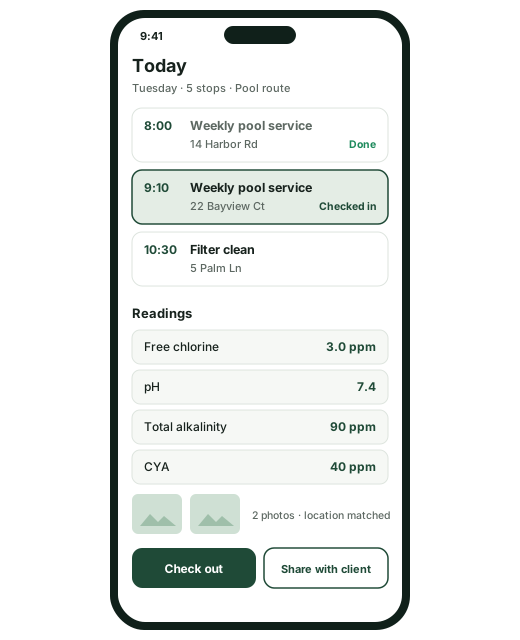
- Stops in order, each with the address, the time window and checklist progress
- Check in and out at the address; the hours on the daily log come from there
- Readings due, such as pool chemistry, and photos matched to the address by GPS
- The office sees every crew member's route and reorders stops
- One-off visits and jobs sit alongside your routes
Daily logs and client updates
One log per job per day, mostly filled in for you, and one email that tells the client what was done.
Crew and hours from check-ins
Who was there and for how long comes from check-in and check-out, and you can correct it.
Work done and materials
What was done, the materials used with quantities, and the weather, prefilled from the National Weather Service forecast for US addresses when it's available.
Trade fields
Readings checked against your trade: pool chemistry (free chlorine, pH, total alkalinity, CYA), gallons of paint and more.
Progress photos
The day's photos from the job, matched to the address by GPS.
Client notes and internal notes
Client notes are shared with the client. Internal notes stay inside your company and never leave.
Share with client
One email to your client in their language, with the client notes translated (the original below), the readings and up to 6 photos attached.
Estimates and invoices, kept simple
Send what you'd write on paper, from your own price book, and keep track of what's accepted and paid.
From your price book
Lines from your price book or typed freely, with quantity, unit and price, a tax percentage, notes and a due date.
Sent by email
Your client gets the estimate or invoice by email, in their language, with the lines and totals. No account needed.
You record the outcome
Mark an estimate accepted or declined and turn it into an invoice. Mark an invoice paid with the amount, the date and how: cash, check, card, bank transfer or other.
Prices stay in the office
Admins and managers see amounts. Field employees never see prices.
Project estimates Pro
Good, better and best options, client approval and e-signature, change orders and progress billing, for jobs that run in phases.
Online card payments Coming
Clients paying by card online (Stripe) and approving estimates online are coming next. Today you record payments yourself.
Subcontractors and jobs from property managers
One job can be shared between two Groundsman companies, and each one sees only that job.
Invite a subcontractor to one job
They get a free Groundsman workspace and see only that job: its checklist, timeline and their own photos. Never your clients, your prices or your other jobs.
Or send a job link
A private link by email with no login: they accept, give an arrival time, add photos and mark it done.
Jobs from property managers
When a property manager who uses Groundsman assigns you a job, it lands in your Jobs under Shared with you. You accept or decline.
Coming next
Not available yet. We'll move each one into the sections above when it ships.
Card payments from clients online Coming
Clients pay an invoice by card from the email (Stripe).
Online estimate approval and a client portal Coming
Clients approve an estimate online and see their visits and invoices in one place.
"On my way" by text message Coming
Text messages (SMS) to clients. Today client messages go by email.
Route optimisation Coming
The best order for the day's stops, worked out for you. Today you set the stop order.
QuickBooks sync Coming
Estimates, invoices and payments synced with QuickBooks.
Contractor pricing
Free for a crew of up to 3 and 25 active clients. Pro is $29 a month plus $12 per active field user, free for 90 days, or 12 months for companies that join by April 30, 2027. Compare contractor plans.
Free
For a small crew running routes and jobs. Free for as long as you use it.
Start free$0foreverNo credit card needed.Includes:
- A crew of up to 3 people and up to 25 active clients
- Recurring routes on each crew member's Today: stop order, checklists, readings, check-in and check-out, and photos
- Jobs and one-off visits
- Clients and addresses: type them, paste them, import a CSV or describe them to the AI composer
- Trade template packs for landscaping, pool service, painting, house cleaning and handyman: services, checklists, a price book and message templates such as "On my way" and "Done, photos attached"
- Daily logs: crew and hours from check-ins, work done, GPS-matched progress photos, weather, materials, client notes and internal notes, and trade fields such as pool chemistry readings or gallons of paint
- Client updates by email in the client's language, with photos attached
- Simple estimates and invoices from your price book, sent by email; you mark them accepted or paid
- Subcontractors: invite one to a single job (they get a free Groundsman workspace and see only that job), or send a job link that needs no login
- Jobs from property managers who use Groundsman land in your Jobs when they assign you; you accept or decline
- A simple app: Today, Jobs, Clients, Estimates & invoices, Team
- English and Spanish, with messages translated to each reader's language
- $10 a month of AI included (fair use)
- Mobile app for iPhone, Android and the web
Pro Free for 90 days
Unlimited clients and crew, projects with phases, and timecards for payroll.
Start your 90-day trial$29per month, plus $12 per active field userAfter your 90-day free trial. The office and the account owner are included in the $29.Everything in Free, plus:
- Unlimited clients and crew
- Projects with phases from trade templates (painting: prep, prime, paint, touch-up, walkthrough)
- Project estimates with good, better and best options, client approval and e-signature, change orders and progress billing
- Field workforce: timecards from clock-in and check-ins, overtime alerts and payroll export (CSV)
- $400 a month of AI included
- Scheduled report delivery and the AI morning briefing
- Priority support
Questions from contractors
Is Free really free?
Yes. No time limit and no credit card. Free covers a crew of up to 3 people and up to 25 active clients, with routes and Today, jobs, daily logs, client updates, simple estimates and invoices, the trade packs, the AI composer and $10 of AI a month at fair use. There's no limit on addresses.
What counts as an active client?
A client with at least one active address, or one you've added without an address yet. A client whose addresses are all inactive doesn't count toward the 25.
What counts as a crew member, and as a field user?
On Free, your crew of up to 3 is everyone on your staff: admins, managers, coordinators and field employees, you included. On Pro, each active field employee is $12 a month; the office and the account owner are included in the $29. Clients, subcontractors and people opening a job link never count.
Can my subcontractor use it?
Yes. Invite them to a job and they get a free Groundsman workspace that sees only that job, never your clients, prices or other jobs. Or send them a job link: no login, and they can accept, give an arrival time, add photos and mark it done.
Do my clients need to sign up?
No. Clients get emails: updates with photos, estimates and invoices, each in their language. They never need an account.
Can clients pay online?
Not yet. Card payments online (Stripe) and online estimate approval are coming next. Today you send the invoice by email and mark it paid when the money arrives: cash, check, card, bank transfer or other.
Can I text my clients "On my way"?
Not yet. Text messages are coming later; today the "On my way" and "Done, photos attached" templates go by email.
Is it in Spanish?
Yes. Every screen, trade pack and email template is in English and Spanish, and each person chooses their language. Messages and client updates are translated into the reader's language, with the original one click away.
A property manager uses Groundsman. What do they see of my business?
Only the jobs they assign you. When you accept, you work on that one job; they never see your other clients, prices or jobs, and you never see theirs.
How do I sign up?
Send the form below. During our launch a person reviews every request and emails your invitation, usually within one business day. Pro is free for 90 days from your first sign-in.
Start free
Tell us about your business. We'll review your request and email your invitation, usually within one business day.
Your routes, your crew, your clients. Free to start.
Routes on each crew member's phone, daily logs with photos, and client updates in their language.