Free, for good. Not a demo.
The Free plan is a complete maintenance system for a small portfolio: up to 3 properties (or 25 doors) and 3 team members, with no time limit and no credit card. When you want the advanced and AI features, Pro is free for your first 90 days.
What you get on Free
Everything you need to stop running maintenance from texts and spreadsheets.
Requests and work orders
Capture every request and turn it into a work order with tasks, photos, notes and an assignee.
QR code intake
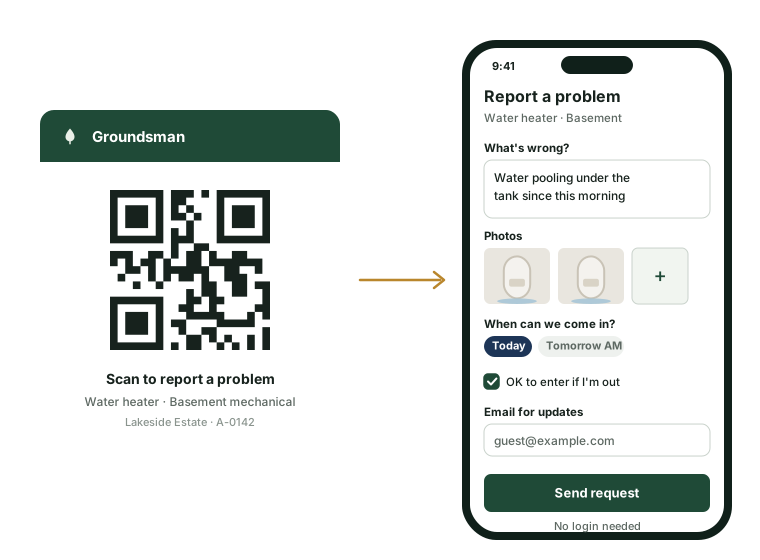
Print labels for properties, rooms and assets. Guests and residents report problems by scanning, with no app or login, add photos and video, and get a link to follow the status.
Emergency detection
Reports of gas, smoke, flooding and other dangers, in English or Spanish, are flagged the moment they arrive and alert your admins and managers by email.
Asset register with QR labels
Make, model, serial, warranty, manuals and service history for every appliance, system and boat.
Photos and documents
Attach photos, manuals, warranties and invoices to any record, with 5 GB of storage.
Basic owner portal
Owners see open and finished work, photos and documents for their properties.
The mobile app
Install it on iPhone, Android or the desktop. Your team works from their phones, even offline.
Email notifications
The right people hear about new requests, assignments and finished work.
English and Spanish
Every screen and message works in both languages for your team, residents and owners.
Full data export
Your data is yours. Export everything to CSV and JSON whenever you like.
When you're ready, Pro does the busywork
Pro adds the features that save the most time as a portfolio grows. Try all of it free for 90 days.
AI triage and digests Pro
Requests arrive with a suggested trade, urgency and asset, and possible duplicates flagged. Owners get a weekly digest written for you, with spend and photos.
Rules and approvals Pro
Routine work approves itself under the owner's limits. Owners approve the rest by text or email.
Preventive and seasonal programs Pro
Filters, generator tests, pool openings, winterizing and storm prep, scheduled automatically.
Inspections with photo comparison Pro
Before-and-after photos aligned, with changes found and labelled for you.
Vendor portal and compliance Pro
Vendors accept jobs and upload invoices; expired insurance blocks dispatch.
Budgets, billing and QuickBooks Pro
Owner invoices from real job costs, budgets and capital plans, synced to your books.
Free and Pro side by side
Free
For a small portfolio getting organized. Free for as long as you use it.
Start free$0foreverNo credit card needed.Includes:
- Up to 3 properties (or 25 doors) and 3 team members
- Requests and work orders
- QR code intake for every property, room and asset, with photos, video and a status link
- Asset register with printable QR labels
- Photos and documents, with 5 GB of storage
- Basic owner portal
- Mobile app for iPhone, Android and the web
- Email notifications
- English and Spanish, and full data export
Pro Free for 90 days
The advanced and AI features that take the busywork off your team.
Start your 90-day trialManagement firmfrom$2.50per door / monthAfter your 90-day free trial. Minimum $250 a month.Estate$149per property / monthAfter your 90-day free trial. Every building on the estate is included.Everything in Free, plus:
- AI triage, nameplate capture and owner digests
- Auto-approval rules, and owner approvals by text and email
- Preventive maintenance and seasonal programs
- Inspections with photo comparison
- Vendor portal and compliance tracking
- Scheduling board and on-call paging
- AI phone and text concierge
- Budgets, capital plans, owner billing and QuickBooks sync
- Estate operations: arrival prep, storm programs, smart home
- Unlimited properties and users
- Priority support
Free saves time on day one. Pro saves more.
The core workflow in Free (QR intake, work orders, the field app, the asset register and the owner portal) removes a large share of the back-and-forth. Pro's rules and AI remove most of the rest.
Estimated hours saved per month for a 3-property portfolio
Hours per month (estimated)
- Core workflow (every plan)
- Pro advanced and AI features
Show the numbers as a table
| Task | Core workflow (every plan) | Pro advanced and AI features | Total |
|---|---|---|---|
| Owner updates and reports | 0.8 | 0.9 | 1.6 |
| Documenting finished jobs | 0.7 | 0.1 | 0.8 |
| Preventive and seasonal planning | 0.0 | 0.8 | 0.8 |
| Logging new requests | 0.6 | 0.1 | 0.7 |
| Owner billing and bookkeeping | 0.0 | 0.7 | 0.7 |
| Scheduling and dispatch | 0.3 | 0.3 | 0.6 |
| Getting owner approvals | 0.1 | 0.4 | 0.6 |
| Triage and assignment | 0.1 | 0.4 | 0.5 |
| Finding asset details | 0.5 | 0.0 | 0.5 |
| Vendor paperwork and compliance | 0.0 | 0.4 | 0.4 |
| Total | 3.1 | 4.1 | 7.1 |
Estimates based on typical workflows; actual results vary. How we estimate.
Questions about Free
Is there a catch?
No. Free is meant to be useful on its own for small portfolios. We make money when growing teams choose Pro for the time it saves.
What happens if I add a fourth property?
You'll be asked to start Pro. If you haven't used your 90-day trial yet, it starts then, free.
Do I need a credit card for the Pro trial?
No. You only add a payment method if you decide to keep Pro after 90 days.
Can owners and vendors use Groundsman on Free?
Owners get the basic owner portal. Residents and guests report problems by QR code. The vendor portal is part of Pro.
Do guests need an app or an account to report a problem?
No. They scan the QR label, describe the problem, add photos or video and send it. They get a reference and a link to follow the status, with no account. The page works in English and Spanish.
Set up your first property today
Free for up to 3 properties, for as long as you like. Pro free for 90 days.