Your home, kept. Free for your primary home and a second home.
Groundsman for owners is the place for your home's todos, maintenance, vendors and records. It's free forever for your primary home and a second home, and Pro covers a third and more. If you already have a manager on Groundsman, you get the same tools in their portal.
What every owner gets
Useful on day one, whether or not you have a manager.
Todos with reminders
Type a todo the way you'd say it ("replace the furnace filter every 3 months, remind me a week before") and the assistant fills in the date, the repeat and the reminder. Share todos with your household.
Seasonal checklists
HVAC filters, gutters, smoke detectors, the water heater, winterizing, hurricane prep, pool opening and closing, chosen for your home's equipment and location, with email reminders.
Quotes, collected for you
Paste your vendors' emails, we'll collect and compare quotes for you. Each vendor gets a simple link to quote without an account, reminders before the due date, and a polite note if you choose someone else.
Home records
Rooms, appliances and systems with make, model, serial and warranty ("your dishwasher warranty ends in 60 days"), with documents and photos in one place.
A home binder
Download a PDF of your home's records for insurance, a sale or a new manager, or share a read-only link that expires.
Spending
Note what you spend on each home by category and see the year at a glance.
Weather and alerts
Current conditions and active National Weather Service alerts for each US home.
Household and delegates
Invite a spouse, a family member, an assistant or your accountant, with the permissions you choose.
English and Spanish
Every screen and email works in both languages.
Set up your home in a few minutes
Add your home
Enter the address and the type of home.
Confirm the suggestions
The assistant suggests rooms, common equipment and a seasonal checklist. Untick anything that doesn't apply; nothing is saved until you confirm.
Get reminders
Your checklist becomes todos with email reminders, shared with your household if you like.
When you want help: find a manager
If you have several homes, many open items or a rental, Groundsman offers to connect you with property managers in your area who use Groundsman.
You choose what's shared
Managers see only the summary you agree to share, such as your region and the type of home, never your address or records, until you connect one.
Connect and end at any time
Connecting gives the manager access to the homes and records you choose. You can end it whenever you like, and it stops at once. Your records stay yours.
Or invite your own manager
Work with someone who doesn't use Groundsman yet? Invite them by email to help with the homes you choose.
Already have a manager on Groundsman?
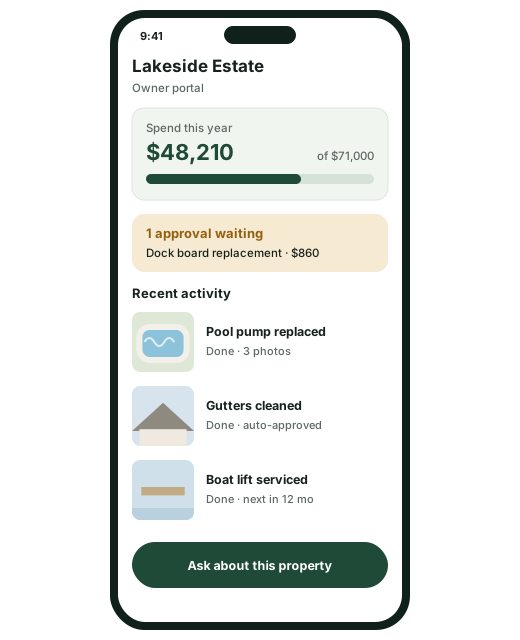
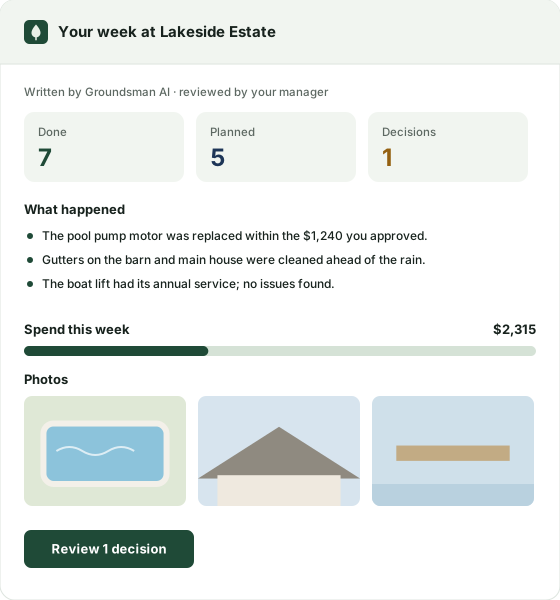
Your manager can invite you to their owner portal, with their logo and Groundsman's tools: requests, work and photos as they happen, what's waiting for your approval, spending, a digest by email, and messages with your manager, plus your own todos and records.
- See your homes' activity without calling anyone
- Approve or ask questions in one place
- A digest that leads with what matters, then spending
Questions from owners
Is it really free?
Yes. Groundsman is free for owners with a primary home and a second home, with no time limit and no credit card. A third home needs Pro.
Do my vendors need an account?
No. They get an email with a private link to send their quote, and they can tell you they can't quote. Phone numbers you paste are kept for text messages, which we'll add later.
Who sees my information?
Only you and the people you invite. A manager sees your homes only after you connect them, and only what you choose. You can end it at any time.
What does the assistant do?
It suggests: rooms and equipment for your home, the checklist items that fit it, a todo from a sentence, and what each quote leaves out of the job. You confirm everything, and it never states prices or picks a vendor for you.
How do I sign up?
Send the form below. During our launch a person reviews every request and emails your invitation, usually within one business day.
Start free
Tell us a little about you. We'll review your request and email your invitation, usually within one business day.
Free for your primary home and a second home
Todos, seasonal checklists, quotes collected for you, records and a binder you can share.