One system for every property you look after
Groundsman covers the whole job: what you own, what breaks, who fixes it, what it cost and what the owner sees. Each part works on its own, and together they remove the chasing.
Portfolio and assets
Model what you actually run: owners (people, trusts or LLCs), properties, buildings, units, rooms and the assets inside them. An estate is one property with many buildings and spaces.
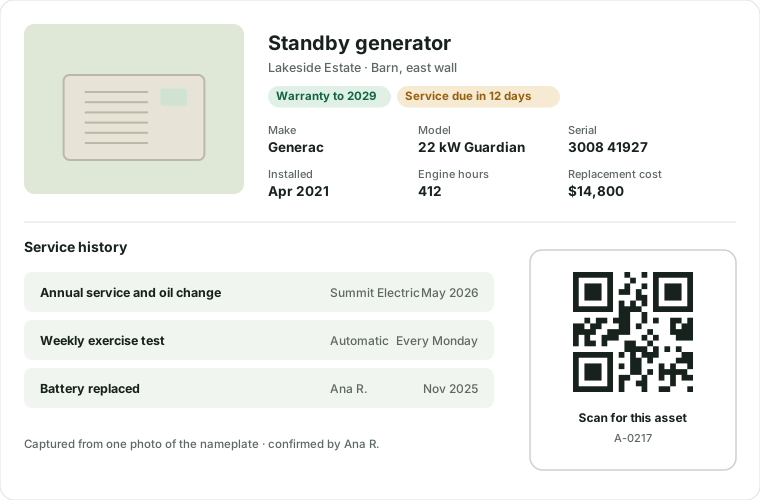
Every asset carries its make, model, serial, install date, warranty, expected life, value and manuals, so the next person never has to crawl behind the water heater to read a label.
- Map point, geofence, access notes, photos and custom fields per property
- Printable QR labels for properties, rooms and assets on standard label sheets
- Nameplate capture: one photo fills make, model and serial, and a person confirms
- Service history, warranty status, remaining life and replacement cost on every asset
Requests, QR intake and AI triageAI triage in Pro
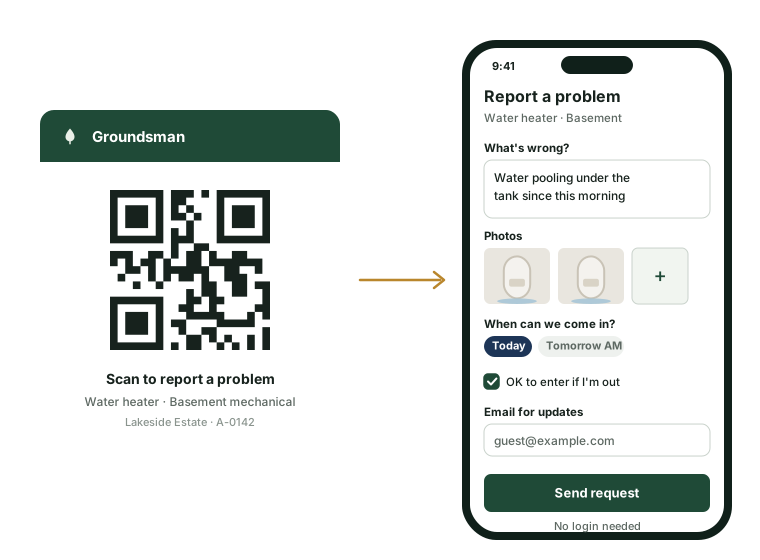
Anyone can report a problem in seconds. A printed QR code opens a public page for that exact property, room or asset: no app, no login. It takes the issue, photos, video, a voice note, availability and permission to enter. The reporter gets a reference and a private status link, by email too if they leave an address.
The resident portal, email, phone, text and your own team all create the same request. AI triage suggests the trade, urgency, a safety flag, the likely cause and the probable asset from your register, spots possible duplicates at the same property and suggests who should go. Apart from raising the alarm on a likely emergency, nothing changes until a person accepts, edits or merges it.
- QR codes never expire, and labels can be revoked and reissued
- Intake is rate-limited and protected by a bot check, so a printed code can't be used to flood your queue
- Photos and video go straight from the phone into the request
- Reporters follow progress on their status link, which never shows notes or names
- Accept, edit or merge in one click, with keyboard shortcuts
- Every suggestion shows its confidence and a one-line reason, and the share your team accepts unchanged is tracked
- Names, emails and phone numbers are removed before the AI reads a report
- Gas, smoke or flooding, in English or Spanish? It's flagged the moment it's reported, your team is alerted at once, and approval is skipped
Work orders, scheduling and dispatchBoard in Pro
A work order carries the tasks, checklist, required before-and-after photos, parts, labor, entry window and the resident's availability. Assign it to your staff or a vendor; the status follows a clear lifecycle, including on hold, awaiting parts and reopened.
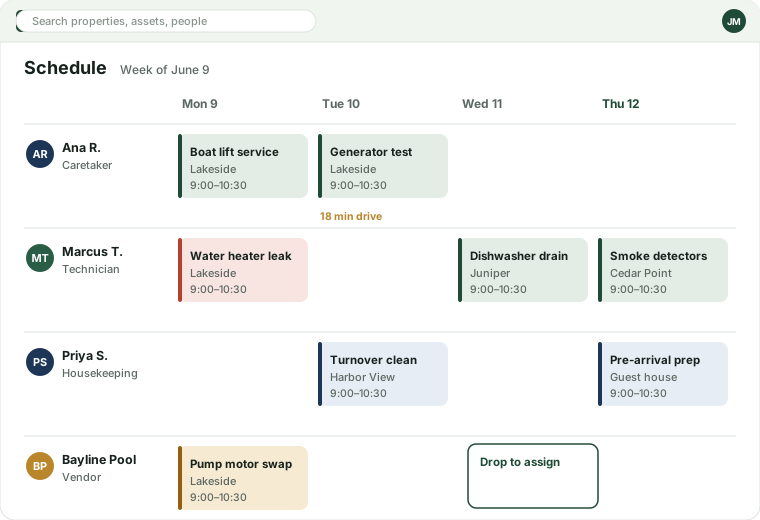
The scheduling board shows every person's day with drive time between stops. Drag a job to reassign it.
- Completion requires the checklist and photos; AI drafts the summary
- Recurring work such as weekly pool service and lawn care
- Callbacks: a repeat failure within 30 days reopens the original job
- “While we're there” suggests other open items at the same property
Rules and approvalsPro
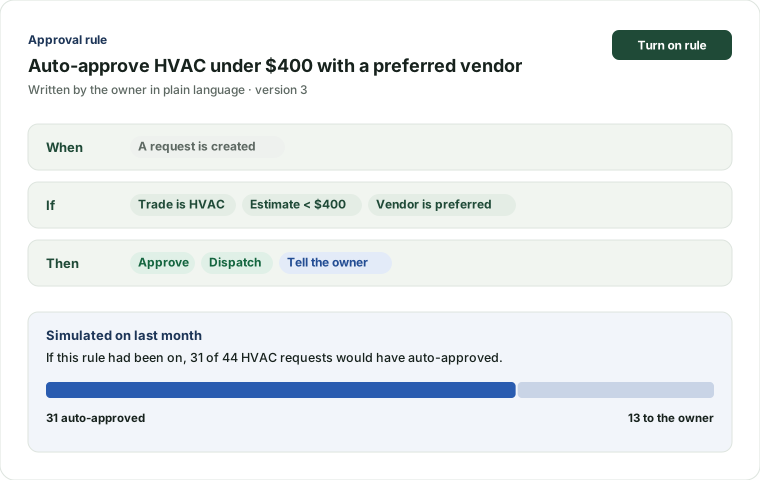
Owners set the rules; Groundsman enforces them and never exceeds them. Type a rule in plain language, like “auto-approve HVAC under $400 with a preferred vendor”, and see it as structured conditions you can check.
Before you switch it on, simulate it against last month: “31 of 44 requests would have auto-approved.”
- Conditions on amount, category, property, vendor, time of day and month-to-date spend
- Outcomes: approve, ask the owner, ask a delegate or decline
- Owner approvals by text or email, with a not-to-exceed amount, expiry and reminders
- Text replies carry a short code, like YES 4821, so approvals never get mixed up
Preventive and seasonal maintenancePro
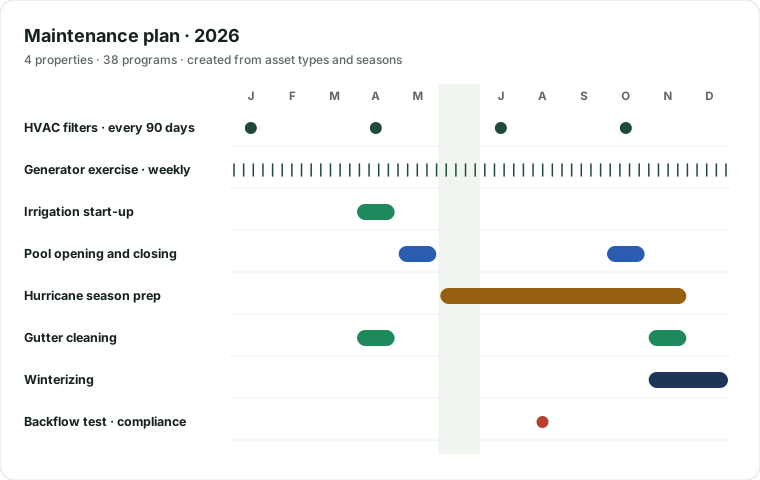
Add an asset and its maintenance plan comes with it: HVAC filters every 90 days, a weekly generator exercise, a yearly water heater flush. Seasonal programs cover hurricane prep, winterizing, pool opening and closing, irrigation start-up, gutters, and dock and boat-lift service.
A compliance calendar tracks licenses, certificates and inspections such as backflow tests, with reminders before they're due.
- Templates by asset type, with manufacturer intervals
- Meter readings, like engine hours, drive service intervals
- Weather alerts and smart-home sensors can start a program
Inspections and photo intelligencePhoto comparison in Pro
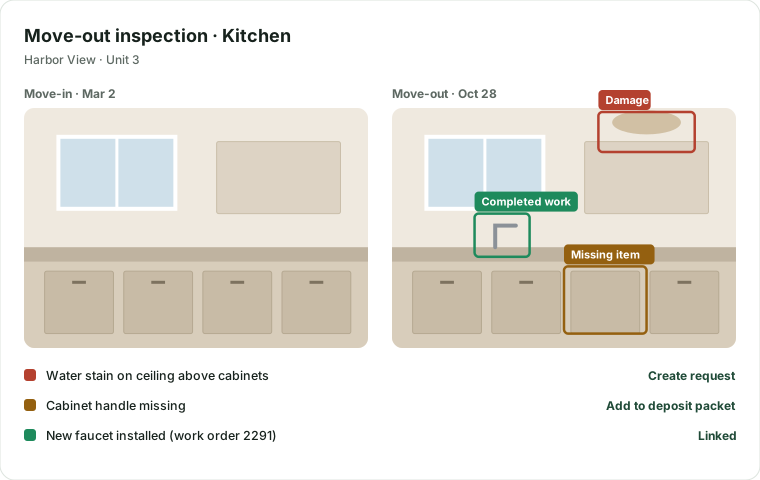
Templates for move-in, move-out, seasonal, pre-arrival, insurance and vendor completion. Each item takes a rating, notes, photos and a signature.
Guided capture overlays the last photo of the same spot. Groundsman aligns before and after, finds what changed, and labels each change as damage, wear, cleanliness, a missing item or completed work.
- Each finding links to a suggested request
- Side-by-side and slider viewers
- Export claim and deposit packets as signed PDFs
The field app
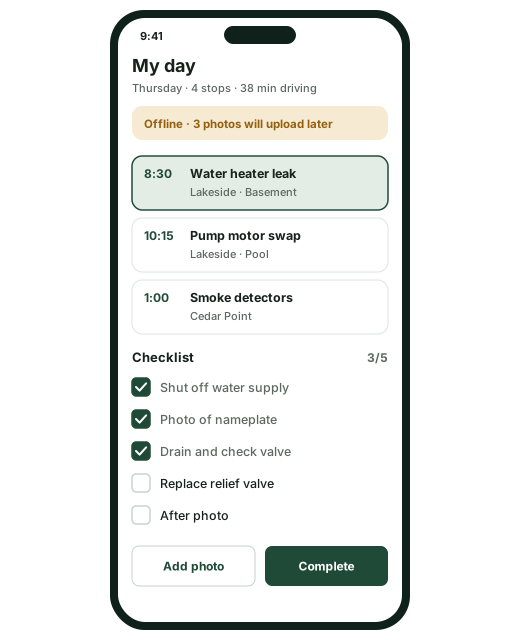
Caretakers, technicians and housekeepers get their day on their phone: the route, the jobs, checklists, photos, parts and notes. It works offline in a basement or a boathouse and syncs once, with no duplicates, when there's signal.
One app for iPhone, Android and the web, in English and Spanish.
- Check-in confirms the worker is on the property
- Photos queue and upload automatically
- If a job is cancelled while offline, notes are kept and the worker sees why
The owner experience
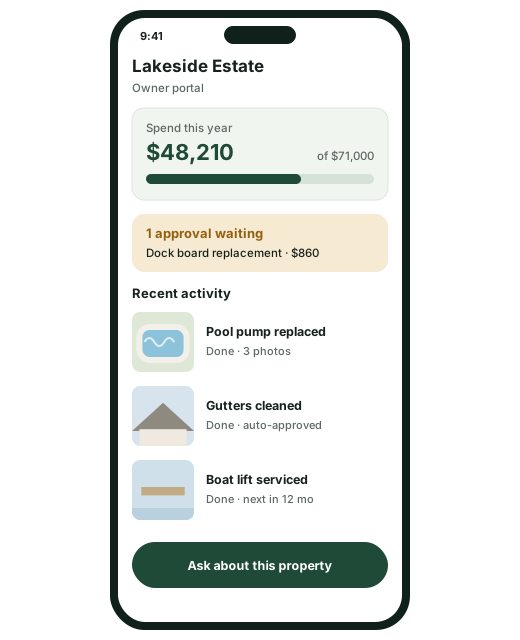
Owners see everything they care about without calling anyone: activity, open and finished work, approvals waiting, spend against budget, photos and documents, for each property.
A weekly digest, written by AI and checked against the books, covers what happened, what's planned, decisions needed, spend and three photos. Owners can ask questions in plain English, like “what did we spend on the pool this year?”, and get answers linked to the records.
- Delegates: family members, family offices, accountants or attorneys, each with chosen permissions
- Preferences in plain language: limits, preferred vendors, quiet hours and channels
- Annual budgets and a 1-to-5-year capital plan, drafted from asset life and inspections
Vendors and compliancePro
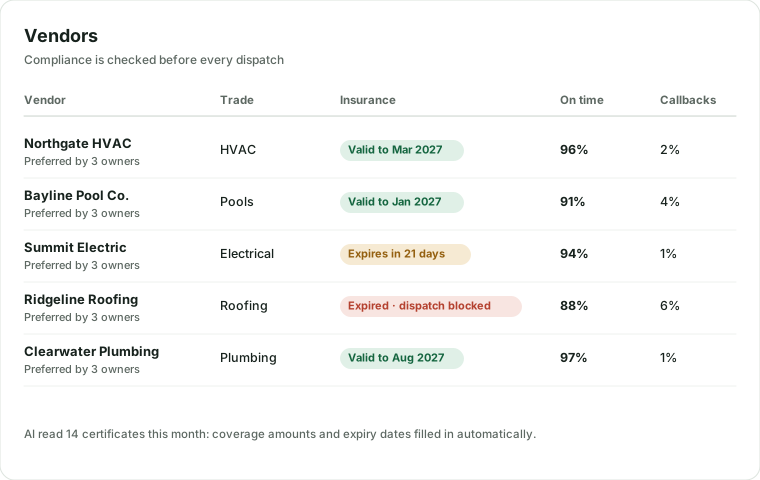
Keep a directory of the trades you trust, with service areas, rates, contacts and which owners prefer them. AI reads each insurance certificate, license and W-9, records coverage and expiry, and reminds the vendor 30 days before it lapses.
An expired certificate blocks dispatch unless a manager overrides it, and the override is logged.
- Vendor portal: accept or decline, post an ETA, upload photos and invoices
- Scorecards: on-time rate, callbacks, cost against estimate, owner ratings
- One vendor login across every company they work for
Communications, on-call and the AI conciergePro
Every email, text, call and note is threaded against the property, the person and the job. Templates work in English and Spanish, and every person has their own channels and quiet hours.
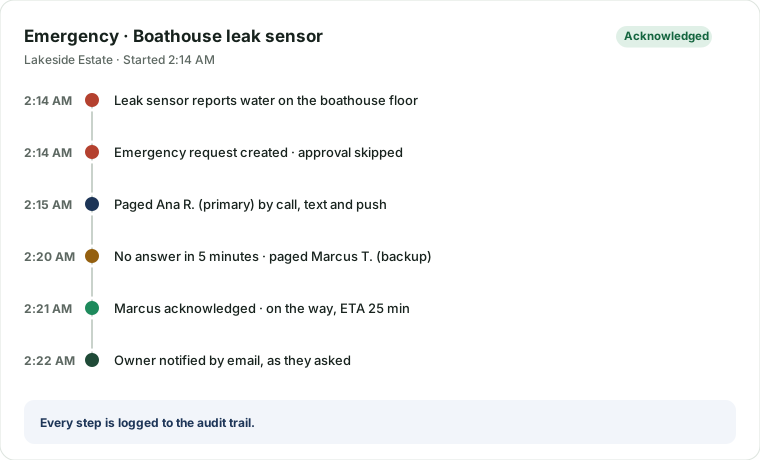
Emergencies always reach a person. On-call rotations page by phone, text and push, and move to the backup if nobody answers in five minutes. The AI phone and text concierge answers residents and guests around the clock, opens requests and tells callers it's an AI.
- Primary and backup rotations per company or property group
- Every page, escalation and acknowledgment is logged
- Opt-in, opt-out and STOP handled for you
- The concierge never reads out gate codes or private details
Documents and the vault
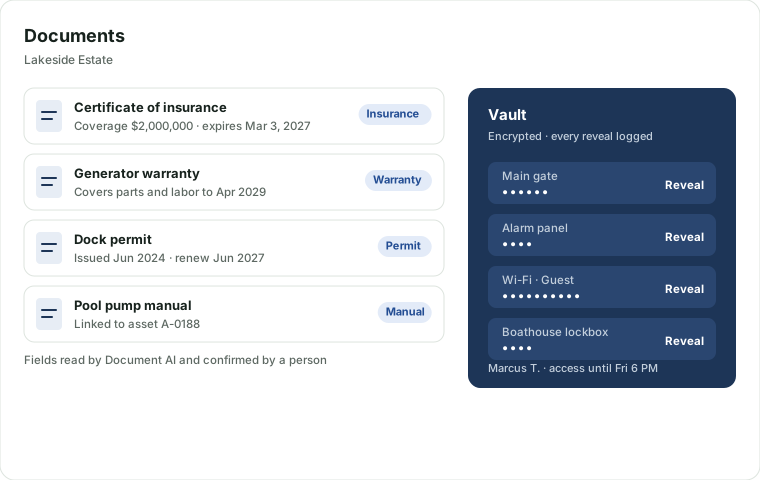
Attach manuals, warranties, permits, policies, agreements, invoices and photos to any record. Document AI classifies each file, pulls out amounts, dates and coverage, and suggests where it belongs. Anything it isn't sure about goes to a review queue.
Gate, alarm, Wi-Fi, lockbox, door and safe codes live in an encrypted vault. Managers reveal a code with a reason. Field staff and vendors see one only inside access granted for a set time, and can ask for it in one tap. Every reveal is logged, refused attempts too, and a revealed code hides itself after 30 seconds.
- A property knowledge base with an audience on every note: resident, vendor, staff or owner
- Key and fob checkout with due dates
- E-signature with an audit certificate
- Each code is sealed with its own key, bound to your company, and changing a code replaces its key
- AI never touches the vault: the system refuses if a model asks
- Deleting a code destroys it for good, and only company admins can
Billing and accountingPro
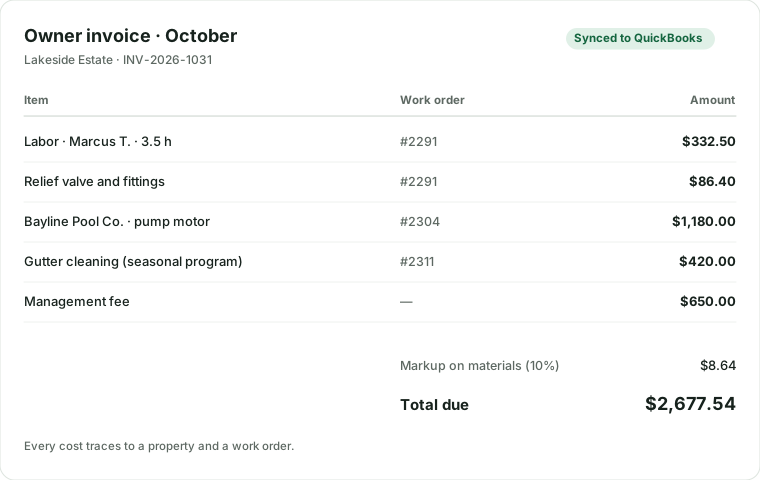
Every cost is tied to a property, a work order or a project: labor, materials, vendor bills and mileage. Owner invoices and statements come straight from that, with markup and management fees, in batches each month.
AI reads vendor invoices, matches them to the work order and routes them for approval. If you keep your own books, invoices and bills sync to QuickBooks Online or Xero.
- Budgets per property, with alerts on thresholds
- Owner invoices delivered as PDFs and in the portal
- Re-running a sync never creates duplicates
Estate operationsPro
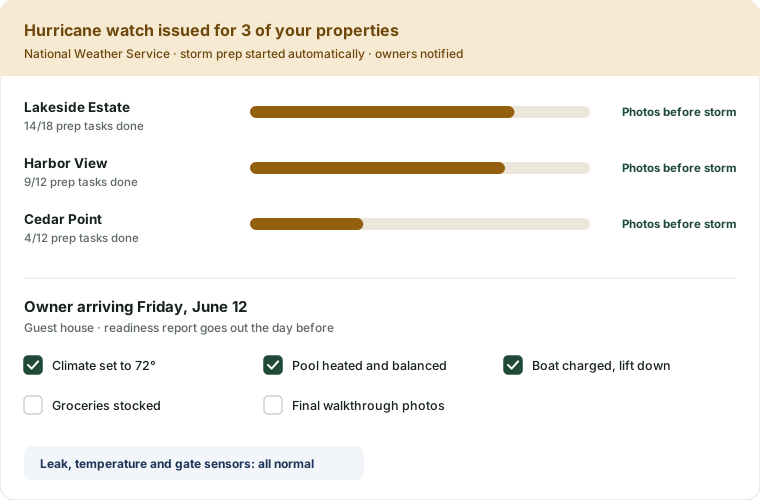
What sets Groundsman apart for family estates. An owner's arrival on the calendar starts the prep checklist for climate, supplies, pool, boat and cleaning, with a readiness report and photos the day before. Departures get their own closing list.
When the National Weather Service issues a hurricane watch for a property's area, the storm program starts: a prep checklist per property, a status board for you, and a notice to the owner. Afterwards, inspections compare against the pre-storm photos.
- Smart-home sensors through Home Assistant: leaks, temperature, power, generator, gate and pool
- Watercraft, vehicles and equipment serviced by engine hours
- Household staff schedules the owner can see
Switch in a day
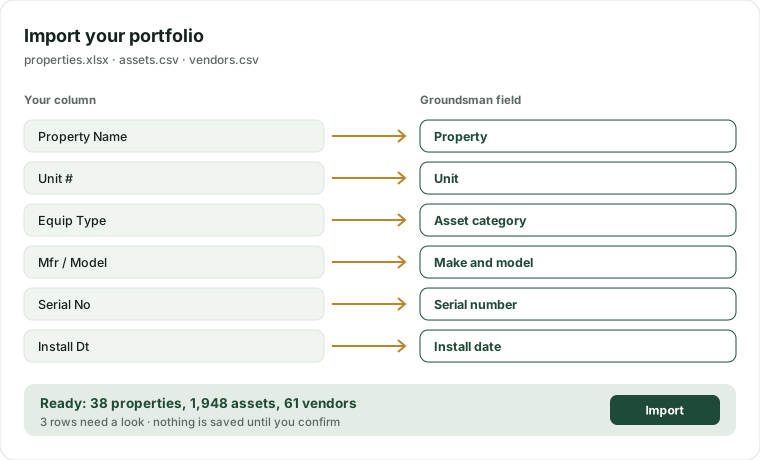
Importing is part of onboarding, not a services project. Bring properties, units, assets, vendors, owners and open work from spreadsheets or exports from the tools you use now. Groundsman maps your columns, shows you what it found, and saves nothing until you confirm.
And you can always take it all back out: full export to CSV and JSON is included on every plan.
- Groundsman templates for every record type
- Problem rows flagged with the reason
- Office plan customers get a hands-on import
See it with your own properties
Start on Free, add a property, print a QR label and send yourself a request.