For family offices that need the whole picture
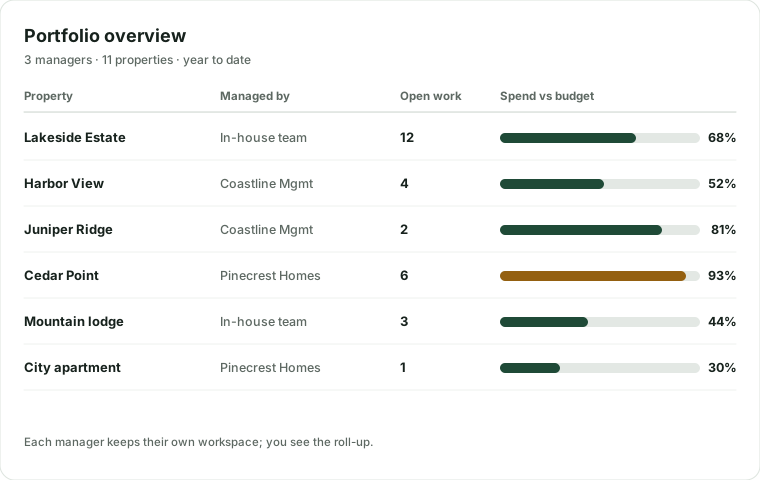
The homes are run by an in-house team in one place and by outside managers in others. Groundsman gives the office one view of all of it, while each manager keeps working in their own space.
Oversight without micromanaging
Cross-portfolio reporting
Spend against budget, open work, response times and capital needs across every property and manager.
Rules the managers can't exceed
Approval limits, preferred vendors and notification preferences set by the family, enforced for every manager.
Budgets and capital plans
Annual budgets drafted from last year's actuals, and a 1-to-5-year plan built from asset life and inspections.
Delegates with exact scopes
Give the CFO spend, the attorney documents and a family member approvals, each only for the properties you choose.
Records for insurers and buyers
Read-only share links for insurers, adjusters, inspectors and buyers. They expire, are logged and show only what you pick.
Answers, not spreadsheets
Ask “what did we spend on roofs across all homes this year?” and get a total with links to the records.
The controls a family office asks for
Single sign-on
SAML or OpenID Connect with your identity provider, on the Office plan.
A dedicated encryption key
Your data encrypted with a key dedicated to your organization, on the Office plan.
Access enforced in the database
Each role, delegate and manager sees only its scope, enforced by row-level security.
A complete audit log
Every change, reveal and AI action is recorded and readable by your admins.
How Office onboarding works
Scope
We map your properties, managers, owners and the reporting you need.
Import
We bring in properties, assets, vendors and history from your managers' systems and spreadsheets.
Configure
SSO, your encryption key, approval rules and delegate permissions.
Roll out
Managers and staff are trained in English or Spanish, and the office gets its first portfolio report.
See your portfolio in one place
Tell us about your properties and managers. We'll show you Groundsman with a portfolio like yours.